TRACKS Attribution Measurement API#
Overview#
The Measurement API tracks the customer acquisition source, enabling you to identify which channels, campaigns, ads drive install and other in-game events. By integrating with TRACKS Attribution, you can accurately attribute conversions to the correct media sources, helping you optimize your marketing efforts.
Prerequisites#
Before you begin, please ensure the following:
- A Google Cloud Platform account with billing enabled (Google Cloud Platform microservices will auto-scale as needed for your game).
- Access to Measurement API credentials (API key and secret).
- A TRACKS account with the attribution package enabled and ready for integration.
- Basic knowledge of server-side programming, cloud services, and API integrations.
- A telemetry server capable of reading and collecting client IPs via HTTP headers or X-Forwarded-For (XFF).
- A webhook, postback, or proxy mechanism that can trigger real-time Measurement API requests or perform batch uploads via cron jobs.
To integrate with TRACKS Attribution, you'll need to create and implement a lightweight server-side HTTP request as a webhook on your backend. The Measurement API is the only supported method for this integration. You can view a pseudo-code example for constructing the API request below.
The webhook should trigger every time a game open (session start) event is logged in your telemetry system.
The Measurement API Endpoint requires the following parameters:
- IP address
- User ID
- Event timestamp
- Platform
- Storefront
API Request Pseudo-code example
# Example Python Code for server-side telemetry
import requests


url = "https://tracks.your-game.com/measure"


payload = {
 'user_id': '1a23fd44c21f8l5r',
 'event_name': 'game_open',
 'ip': '175.124.248.15',
 'time_stamp': '1724094783',
 'platform': 'pc',
 'storefront': 'steam'
}
headers = {
 'Authorization': 'Bearer API_KEY_TOKEN'
}
response = requests.request("POST", url, headers=headers, data=payload)
print(response.text)
For each game added, the Second Stage Analytics team provides comprehensive support for integration, deployment, and testing, starting with an onboarding call.
Architecture#
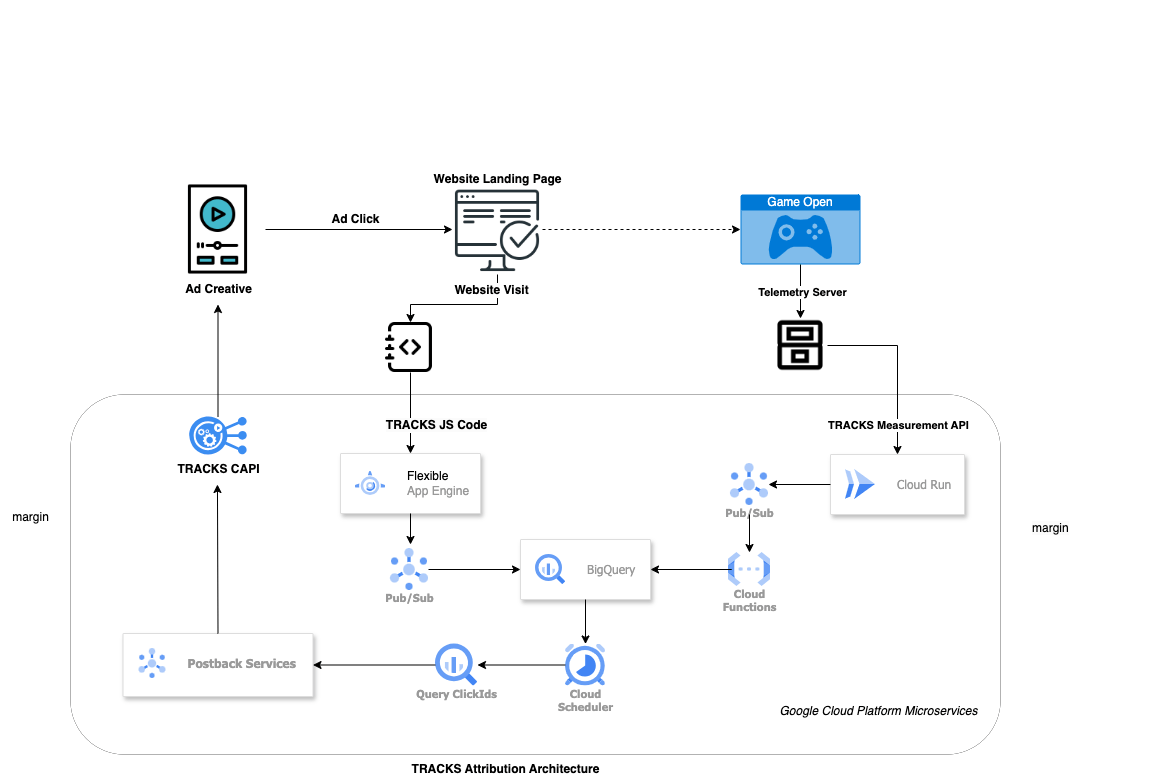
API Endpoints Setup#
To track media channel acquisition sources, you need to implement the API endpoint that records acquisition events.
API Endpoint: /collect
Description: This endpoint records web events, capturing details about the acquisition source.
Method: POST
Endpoint URL: https://tracks.yourgame.com/v1/collect
Headers:
Authorization: Bearer <API_KEY>
Content-Type: application/json
Here is an example of source code for your reference:
    # Example Python Code for web client-side
    import config
    import requests


    def track_acquisition(data):
       headers = {
           'Authorization': f'Bearer {config.API_KEY}',
           'Content-Type': 'application/json'
       }
       try:
           response = requests.post(f"{https://tracks.yourgame.com/v1/collect", json=data, headers=headers)
           response.raise_for_status()
           print('Acquisition event recorded:', response.json())
       except requests.exceptions.HTTPError as err:
           print('Error recording acquisition event:', err.response.json())


    acquisition_data = {
       "event_name": "web_visit",
       "timestamp": "2024-08-29T12:00:00Z",
       "channel": "paid_search",
       "campaign": "summer_sale",
       "source": "google",
       "medium": "cpc",
       "term": "steamsale",
       "content": "ad_1",
       "clientId": "12345",
       "sessionId": "abcdef123456",
       "ip": "175.124.248.15",
       "device": "mobile",
       "browser": "chrome"
    }


    track_acquisition(acquisition_data)
API Endpoint: /measure
Description: This endpoint records web events, capturing details about the acquisition source.
Method: POST
Endpoint URL: https://tracks.yourgame.com/v1/measure
Headers:
Authorization: Bearer <API_KEY>
Content-Type: application/json
Here is an example of source code for your reference:
    # Example Python Code for server-side telemetry
    import requests

    url = "https://tracks.yourgame.com/v1/measure"

    payload = {
     'user_id': '1a23fd44c21f8l5r',
     'event_name': 'game_open',
     'ip': '175.124.248.15',
     'timestamp': '2024-08-29T12:00:00Z',
     'platform': 'pc',
     'storefront': 'steam'
    }
    headers = {
      'Authorization': f'Bearer {config.API_KEY}',
    }
    response = requests.request("POST", url, headers=headers, data=payload)
    print(response.text)
Test Environment#
Test the Integration:
- Click on a UTM-tagged test link and open the game for the first time.
- Ensure your server is running and correctly configured to handle HTTP requests.
- Trigger acquisition events manually or through your application to test the integration.
- Check Cloud Run logging to confirm that the endpoint logs show no errors.
- Verify on the attribution tool dashboard that acquisition events are tracked accurately.
- Ensure that the data (channels, campaigns, sources) aligns with your expectations.
Troubleshooting:
- Invalid Credentials: Confirm that your API key and secret are correct and have the necessary permissions.
- Network Errors: Review your server’s network configuration and API base URL.
- Data Mismatches: Ensure the event payload matches the required schema and that timestamp formats are correct.